Documentation
Before managing or integrating a supplier product list, check that it has been entered and is available to your organisation in " My suppliers ".
Also, please note that you can only manage catalogues of items and services from private suppliers limited to your organisation.
The suppliers referenced by your group are responsible for the data made available to you.available to you.
How would you like to import and manage your products?
Customer
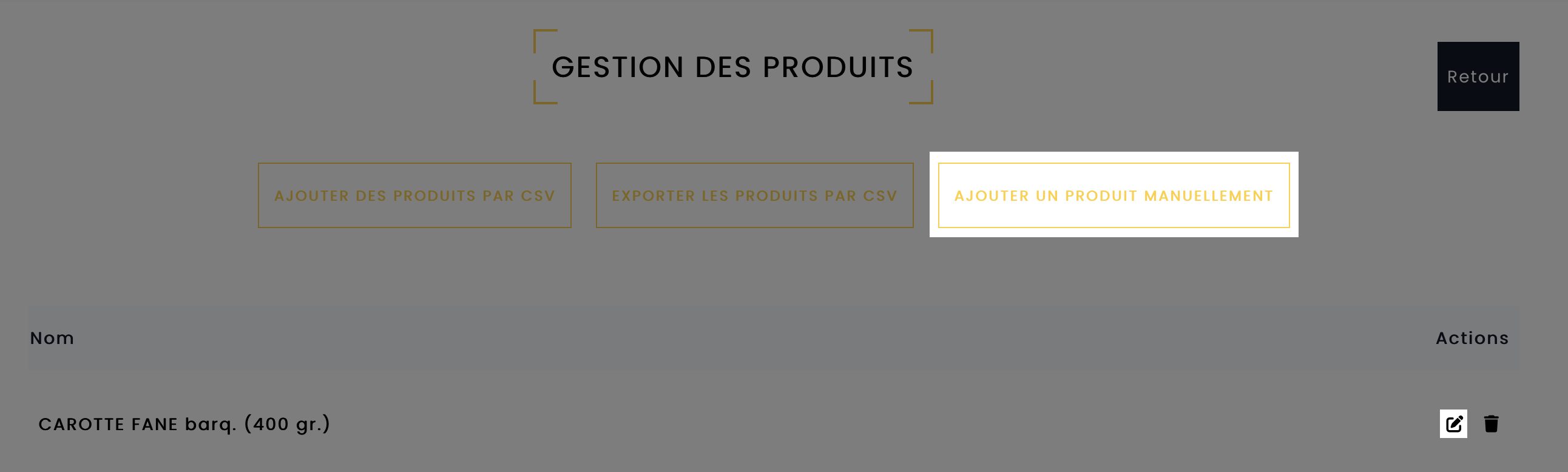
You can manually manage the list of items that your private suppliers make available to you on your terms.It also allows you to modify elements that would otherwise be integrated using another method, such as CSV.
To do so, go to the page listing your private suppliers .
Supplier
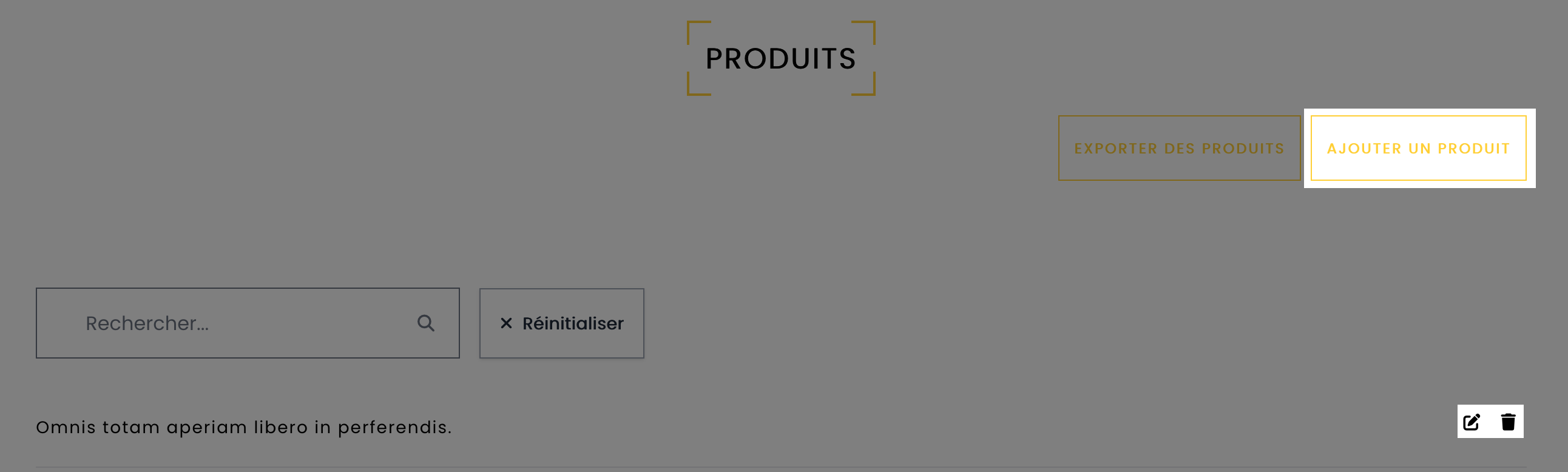
Manually manage your products from your account.Access this feature via 'My Account' => 'Products'.
On this page, you can also add, modify or delete products (see image below).
Explanations
The CSV file is used to enter the basic elements of a product (name, description, price, unit of measurement, category, etc.).It can also be used to enter more complex information, such as delivery times, delivery days and different types of packaging. Each line of the file represents a product.
- The file can be simple, with a single line for each product, or more complex if you integrate different price and delivery constraints, creating several lines for the same product.
- When integrating a CSV file, you'll get an import report to identify any errors. This report may take more or less time, depending on the quantity of products you insert.
- A new import for the same product will replace the previous information for that product.
- If a product is no longer present in your CSV file, it will be removed from the platform, so you need to integrate all products with each update.
Here's an example of a CSV file, with the first line representing a simple product and subsequent lines representing a product containing a quantity discount.
Download example
File format private suppliers
- Type : CSV
- Format: utf8
- Separator : " ; "
- Must contain all fields (header), even if you don't use the column
If you wish to ask your supplier to enter the data, copy the following link and add it to your e-mail. They should then send you the completed file so that you can integrate it.
More precisely, this integration mode, reserved for suppliers, involves uploading a CSV file to a directory provided by SYMPOSIUM. This directory is consulted once an hour to add or modify items.
To do this, ask your supplier to take note of the documentation related to the necessary data and to contact SYMPOSIUM for further information:
API
The REST API lets you manage your products directly from your information system.Your account login and password are required to access the API.
This API makes it easy to manage your products and retrieve orders from your customers.
Please refer to our Swagger documentation for more technical details:
https://mmc.symposium.ch/api/v1/documentation
You may also find the following table of fields useful.
It is possible to have a product whose prices and packaging can be configured. Here's what you can do:
1) Set up quantity discounts
2) Set up discounts per customer
3) Have multiple packages for the same product reference
4) Combine the above elements
Note that a reference from the supplier is equivalent to a product on Symposium. If you have different references for the same product, but with different packaging, this will then create different products.
All prices are in CHF and exclude VAT.
The decimal separator is the point. No thousand separators
Field reference
Your CSV file must include all of the following fields, even if you do not need certain columns. Below the table you will find references, such as category IDs.
| Field name | Type | Remarks / Example |
|---|---|---|
|
product_reference_supplier
Supplier product reference. |
string:255 unique required
String, maximum 255 characters, mandatory and unique field. |
Example : fr061
|
|
product_name_fr
Product name in French. |
string:255 nullable
String, maximum 255 characters. At least one product name is required in the languages. |
These fields are used for the search system. Abbreviations and acronyms are not recommended.
Example : If you name your product 'PTT' and the customer searches for 'potato', they will not find the product.
|
|
product_name_de
Product name in German. |
string:255 nullable
String, maximum 255 characters. At least one product name is required in the languages. |
These fields are used for the search system. Abbreviations and acronyms are not recommended.
Example : If you name your product 'PTT' and the customer searches for 'potato', they will not find the product.
|
|
product_name_en
Product name in English. |
string:255 nullable
String, maximum 255 characters. At least one product name is required in the languages. |
These fields are used for the search system. Abbreviations and acronyms are not recommended.
Example : If you name your product 'PTT' and the customer searches for 'potato', they will not find the product.
|
|
product_description_fr
Product description in French. |
text nullable
String, maximum 1000 |
This field is used for the search system.
Example : The description "High-quality potato, ideal for puree" allows the customer to find the product when searching for "puree".
|
|
product_description_de
Product description in German. |
text nullable
String, maximum 1000 |
This field is used for the search system.
Example : The description "High-quality potato, ideal for puree" allows the customer to find the product when searching for "puree".
|
|
product_description_en
Product description in English. |
text nullable
String, maximum 1000 |
This field is used for the search system.
Example : The description "High-quality potato, ideal for puree" allows the customer to find the product when searching for "puree".
|
|
product_allergies_fr
Allergens in French. |
text nullable
|
Example : Milk, gluten, eggs
|
|
product_allergies_de
Allergens in German. |
text nullable
|
Example : Milk, gluten, eggs
|
|
product_allergies_en
Allergens in English. |
text nullable
|
Example : Milk, gluten, eggs
|
|
product_excluded_organizations
List of organisations excluded from the sale of the product. |
json, nullable
Multiple choice possible |
Only available for referenced suppliers. Allows excluding organisations from the sale of this product. The values are the IDs of the organisations in Symposium.
Example : [1,2,3]
|
|
product_active
Active or inactive product. |
boolean, default:true
|
Allows deactivating a product. If the product is deactivated, it will no longer be visible on the site. 1 = active, 0 = inactive
Example : 1 or 0
|
|
product_image1
URL of the main product image. |
url nullable
Images must be less than 4MB, JPEG and PNG format. |
Must be a valid URL. To best present your product, please insert square images on a white background.
Example : https://www.example.com/image.jpg
|
|
product_image2
Second product image. |
url nullable
Images must be less than 4MB, JPEG and PNG format. |
Must be a valid URL. To best present your product, please insert square images on a white background.
Example : https://www.example.com/image.jpg
|
|
product_image3
Third product image. |
url nullable
Images must be less than 4MB, JPEG and PNG format. |
Must be a valid URL. To best present your product, please insert square images on a white background.
Example : https://www.example.com/image.jpg
|
|
product_image4
Fourth product image. |
url nullable
Images must be less than 4MB, JPEG and PNG format. |
Must be a valid URL. To best present your product, please insert square images on a white background.
Example : https://www.example.com/image.jpg
|
|
product_image5
Fifth product image. |
url nullable
Images must be less than 4MB, JPEG and PNG format. |
Must be a valid URL. To best present your product, please insert square images on a white background.
Example : https://www.example.com/image.jpg
|
|
product_category_ids
Product category ID. |
json required
An existing value is required. |
Allows classifying the product in the search system. See the list of categories
Example : [1]
|
|
product_tva
Defines the VAT rate of the product.. |
string required
An existing value is required. |
Allows defining the VAT rate of the product. NORMAL = 8.1% / REDUCED = 2.6% / ZERO = 0%
Example : NORMAL
|
|
product_origin
Country of origin of the product.. |
string required
ISO country code with 2 letters. |
A product can only have one origin
Example : CH
|
|
product_on_offer
Produit sur demande. |
boolean default:0
|
csv_field_product_on_offer_remarks
Example : true | 1 | false | 0
|
|
deal_rule_minimum_quantity
The minimum packaging quantity to benefit from the price.. |
integer unsigned default:0
>= 0 |
If you hesitate between indicating 1 or 0, consider that some units function in decimal, like Kilogramme. For this reason, we advise you to favour 0, the system will automatically propose whole purchase units when necessary. In case of quantity overlap between your dealRules, the system will select the less expensive price.
|
|
deal_rule_maximum_quantity
The maximum packaging quantity to benefit from the price.. |
integer unsigned default:0
>= 0 |
For an unlimited value, leave empty.
|
|
deal_rule_price
Net price excluding VAT for this product. |
float unsigned default:0
>= 0 |
This price corresponds to the amount that will be charged. Depending on the complexity of your product, you can offer different prices, this for different quantities, packaging or different customers.
|
|
deal_rule_raw_price
Gross price excluding VAT for this product.. |
float unsigned default:0
>= 0 |
This price corresponds to the public price before discount
|
|
deal_rule_deposit_price
Deposit price per unit.. |
integer unsigned default:0
>= 0 |
If you sell deposit bottles, you can indicate the deposit price here.
|
|
deal_rule_nb_day_delivery
Number of days before delivery. |
integer unsigned required
>= 0 |
If you have a delivery time, you can specify it here. 1 day = delivered the next day, if conditions permit (order time and delivery day).
|
|
deal_rule_limit_hour_order
Order deadline. |
integer unsigned default:0
>= 0 |
Indicate the order deadline. Example: if you indicate 12, the customer can order until noon to be delivered the next day.
|
|
deal_rule_delivery_day
Delivery days. |
string required
|
If you have specific delivery days, you can enter them here. For example, if you don't deliver on Sundays, you can enter [",mon", "tue", "wed", "thu", "fri", "sat"]. mon = Monday, tue = Tuesday, wed = Wednesday, thu = Thursday, fri = Friday, sat = Saturday, sun = Sunday
Example : ["mon", "tue", "wed", "thu", "fri", "sat", "sun"]
|
|
deal_rule_unit_id
Sales unit of the product. |
integer unsigned required
Must be part of the units list |
The sales unit (packaging) of the product, see the list of units here.
|
|
deal_rule_unit_comparison
Main unit of the product. |
integer unsigned required
Must be part of the comparison units list. |
The main unit of the product corresponds to the unit of the content that makes up the sales unit. For example, a carton (sales unit) is composed of bottles or litres (main unit). When the goods are delivered, the customer can receive the products in the main units or sales units. See the list of units here.
|
|
deal_rule_qty_unit_parent_to_sell_unit
Quantity of the main unit to sell a sales unit. |
float required
|
Allows knowing the quantity in the sales unit. Example: 1 bottle (sales unit) = 0.75 litre (main unit).
|
|
deal_rule_limited_to_organization_id
ID of the organization for which the prize is available. |
int unsigned nullable
Not compatible with deal_rule_group : the two fields must not be used simultaneously in the same condition. Only for referenced suppliers |
Allows making the price available only for an organisation. To know the IDs of the organisations, look below in the list.
|
|
deal_rule_rfa_authorize
Defines whether the product sales condition is subject to a rebate for the group.. |
boolean default:0
|
If 1, the price is submitted.
Example : true | 1 | false | 0
|
|
deal_rule_default_deal
Not used. |
boolean default:0
|
Must be indicated as a header in the CSV file
|
|
deal_rule_unit_reference_supplier
Supplier sales unit reference. |
string:255 nullable
String, maximum 255 characters, optional field. |
This field has no impact on the site and this information is not shown on the site. It is only used by a supplier who retrieves orders via API, and wishes to ensure that specific packaging is used by the system to transcribe orders.
|
|
deal_rule_preparations
This field allows defining order preparation options that do not influence the product price.. |
array nullable
Preparation table, with all languages |
When the user selects the product, he will have to choose the type of preparation. For example, you could propose a piece of meat with several types of preparation: ground, knife-cut, vacuum-packed, etc. This field has no influence on the unit price of the product.
Example : [{"fr":"haché", "en":"minced", "de":"gechneidet"}, {"fr":"Entier", "en":"Whole", "de":"Ganzer"}]
|
|
deal_rule_group
Allows dealRules to be grouped together. |
string:255 nullable
String of characters, maximum 255 characters, optional field. Not compatible with deal_rule_limited_to_organization_id : the two fields must not be used at the same time. You could group several conditions for different organizations under a single flag. |
In the « Customers » page, you can define a filter (your filter), which is a text field. In your CSV, you can use this field to define a dealRule for an entire customer group.
Note that this field has no influence on entities below a group. For a price to be attributed to a parent organization, and to these 2 underlying organizations, the mention must appear on the 3 entities line of the customer page. You could group several conditions for different organizations under a single indicator.
Example : SECTOR1 for a delivery time. GROUP1 for a price for specific establishments, etc.
|
|
product_department_ids
Not used. |
json
|
Must be indicated as a header in the CSV file. Not used.
|
Category references
-
Energy
- 2 - Water
- 3 - Electricity
- 4 - Gas
- 5 - Energy management
- 112 - Petrol
-
Beverages
- 7 - Beer & cider
- 8 - Hot beverages
- 9 - Soft drinks
- 10 - Spirits
- 11 - Wines & Champagnes
- 12 - Coffee Machine
-
Food
- 14 - Bakery
- 15 - Colds cuts
- 16 - Dressings & Seasonings
- 17 - Dairy products, cheese & eggs
- 18 - Vending machines
- 19 - Savoury goods
- 20 - Sweet goods
- 21 - World spices
- 22 - Fruits & Vegetables
- 23 - Ice cream & sorbets
- 24 - Pastry
- 25 - Prepared meals
- 26 - Fishes & Seafood
- 27 - Laboratory products
- 28 - Sandwiches & snacks
- 29 - Meat, poultry & game
- 113 - Smoking Products
-
Furniture
- 31 - Decoration
- 32 - Beds & mattresses
- 33 - lighting
- 34 - Office furniture
- 35 - Indoor & outdoor furniture
-
Equipment
- 37 - Sports equipment
- 38 - Maintenance equipment & tools
- 39 - Electrical equipment
- 40 - Minibar & vending machine
- 41 - Plumbing & sanitary equipment
- 42 - Locks & safes
- 43 - Signage
- 44 - Textiles
- 45 - Accessories
- 46 - Olfactory ambience
- 47 - Amenities Cosmetics
- 48 - Tableware
- 49 - Promotional items
- 50 - Blankets, downs & pillows
- 51 - Buffet equipment
- 52 - Cleaning equipment
- 53 - Gardening, plants & flowers
- 54 - Bath linen
- 55 - Spa Linen
- 56 - Disposable products
- 57 - Spa cosmetics
- 58 - Cleaning products
- 59 - Resale products
- 60 - Bedding protection
- 61 - Recycling
- 62 - In-room equipment
- 63 - Office equipment
- 64 - Kitchen equipment
- 66 - Uniforms
- 67 - Composite
- 68 - Pet equipment
- 69 - Laundry equipment
- 70 - hvac equipment
- 73 - Childcare & children’s area
- 114 - Packaging solutions
- 115 - Medical equipment
- 118 - Spa equipment
-
IT / Digital
- 75 - Musical ambience
- 76 - Cash register
- 77 - Printers & scanners
- 78 - Equipment & meeting room
- 79 - Computers & servers
- 80 - Wifi service & equipment
- 81 - TV services
- 82 - Dynamic signage
- 83 - Telephone solutions
- 84 - Sound systems
- 85 - TV equipment
- 86 - Home automation
- 87 - Management systems
-
Services
- 89 - Audits & Analyses
- 90 - Dry cleaning for bedding & uniforms
- 91 - Recycling & Waste Management
- 92 - Pest control
- 93 - Disinfection
- 94 - Printing service
- 95 - Laundry service
- 96 - Archive service
- 97 - Storage and distribution service
- 98 - Interior Design services
- 99 - Craftsmen & carpenters
- 100 - Lifts, escalators & automatic doors
- 101 - Design offices
- 102 - Controls, inspections & certifications
- 103 - General building contractors
- 104 - Hvac maintenance
- 105 - Maintenance for kitchen & laundry
- 106 - Multi-technical maintenance
- 107 - Doors & windows
- 108 - Fire protection
- 109 - Maintenance service
- 110 - Graphic design service
- 111 - Social networking & media management
Main units
- id: 6 - Piece
- id: 12 - Liter
- id: 17 - Kilogram
- id: 23 - Hour
- id: 28 - Year
- id: 30 - Month
- id: 32 - Square metre
- id: 34 - Package
- id: 35 - Container (e.g. dustbin)
- id: 36 - License
- id: 37 - kilowatt
- id: 38 - Person
- id: 39 - Meter
- id: 40 - Megabits
Unit references
- 1 - Pallet
- 2 - Carton
- 3 - Bottle
- 4 - Box
- 5 - Units
- 6 - Piece
- 7 - Harass
- 8 - Keg
- 9 - Bag
- 10 - Cans
- 11 - Hectoliter
- 12 - Liter
- 13 - Centiliter
- 14 - Deciliter
- 15 - Millilitre
- 16 - Tonne
- 17 - Kilogram
- 18 - Gram
- 19 - Decigram
- 20 - Centigram
- 21 - Milligram
- 22 - Microgram
- 23 - Hour
- 24 - Minute
- 25 - Second
- 26 - Millisecond
- 27 - Microsecond
- 28 - Year
- 29 - Day
- 30 - Month
- 31 - Cubic meter
- 32 - Square metre
- 33 - Hectare
- 34 - Package
- 35 - Container (e.g. dustbin)
- 36 - License
- 37 - kilowatt
- 38 - Person
- 39 - Meter
- 40 - Megabits
- 41 - Jar
- 42 - Tray
- 43 - Bucket
- 44 - Pack